Several factors may prevent you from upgrading your subscription plan. This guide outlines the most common causes and provides step-by-step solutions to help you resolve the issue.
Ensure You Are Using the Latest Browser Version
Easy Order Manager+ is a SaaS application and relies on browser-based requests to process plan upgrades. In some cases, an outdated browser version may prevent the upgrade request from reaching our servers.
Please ensure that you are using the latest version of your preferred browser before attempting to upgrade your plan again.
Adjust Your Browser Settings
After confirming that your browser is up to date, certain privacy or security settings may still block the upgrade request.
Follow the instructions below based on the browser you are using.
For Safari users:
Navigate to the Privacy tab under Safari Settings and disable the Prevent cross-site tracking option. Once updated, try upgrading your plan again.

For Chrome or Chromium-based browser users:
Follow the steps below, then try upgrading your plan again.
- Click the three-dot menu in the top-right corner of your browser and select Settings.

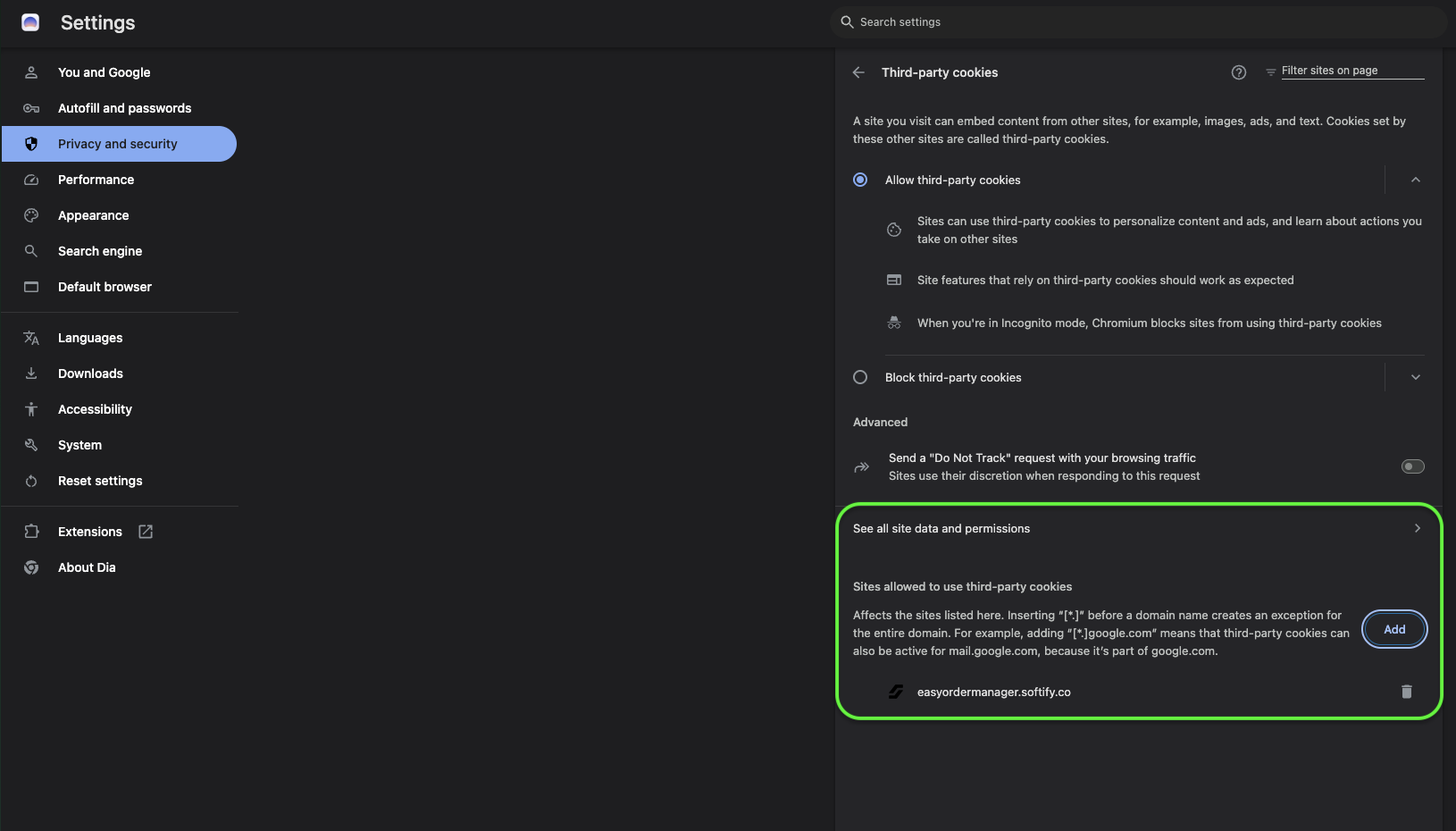
- Under Privacy and Security, select Third-party cookies.

- Enable Allow third-party cookies and disable Send a “Do Not Track” request with your browsing traffic.

- Search for Pop-ups in Chrome settings and add admin.shopify.com to the Allowed to send pop-ups and use redirects list.
- Refresh your browser and attempt to upgrade your plan again.

Important:
Please ensure that admin.shopify.com is allowed to send pop-ups and use redirects in your browser settings.
In Chrome, you can locate this setting by searching for “pop-ups” in the browser settings menu.
If you prefer not to change your global browser settings, you can allow the Easy Order Manager+ domain specifically by adding easyordermanager.softify.co to the Sites allowed to use third-party cookies list.
Disable VPN or Browser Extensions
VPN applications and browser extensions can sometimes interfere with requests sent to external servers.
If you are using a VPN or have multiple browser extensions enabled, temporarily disable them and try upgrading your plan again.
Some extensions may continue to cause issues even when disabled. If the issue persists, try using a different browser or an incognito/private window.
Verify Account Permissions
If you are not the store owner, ensure that your account has permission to approve app charges.
If you are unsure, we recommend contacting the store owner to confirm your access level.
Multiple Stores Under One Account
In rare cases, managing multiple stores under the same account may cause confusion during the upgrade process. Verify that the correct store is selected by checking the store name in the top-right corner of your Shopify admin.
Still Having Trouble?
If none of the above steps resolve the issue, our support team is ready to help.
- Create a support ticket from the Help Center section in your Easy Order Manager+ dashboard
- Or contact us by email